Types of Parallelism for LLM Inference or Deep Learning Explained
TLDR; The parallelism you chose (the way you load your matrices on GPUs) can make the difference between utilization of 50% and 90%.
Introduction#
If you have ever used vllm you probably came across terms like tensor parallel inference or pipeline parallel inference terms in the vllm documentation
. The reason you decide for one over the other is the number of GPUs and the amount of available VRAM on each GPU.
The rule of thumb is:
- If you have only one GPU and the model fits perfectly on one GPU, just use the GPU!
- If you have 1 node and multiple GPUs and…
- The model fits on 1 GPU and you want to maximize throughput by using all the GPUS, use the data Parallelism.
- The model does NOT fit on a single GPU, use tensor Parallelism.
- if the model is too large for a single node, combine tensor parallelism with pipeline parallelism.
Types of Parallelism#
There are (at least) 3 main types of parallelism when it comes to serving LLM on GPUs. Basically the type of parallelism that you choose dictates how your model is distributed among your GPUs. Pictures below will hopefully give you good idea about the concept.
1. Pipeline Parallelism#
This approach splits the model by it’s layers and each set of layers will live on different GPUs.
For example, if you have a Neural Network with 30 layers and 3 GPUs, this approach will put layers [0 to 9] on GPU number 1, layers [10 to 19] on GPU number 2 and so on.
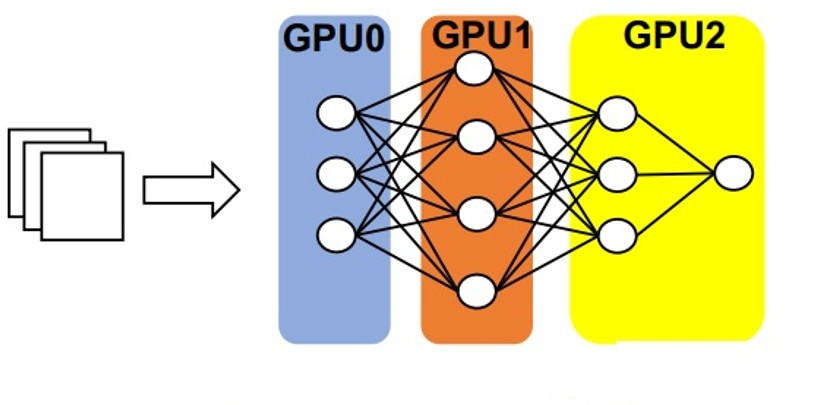
Pipeline Parallelism. Image source
Pipeline Bubbles#
One really important concept that you should be aware of is that when you put each layer on a different GPU, through out the computations, one layer should wait for the last layer to finish its calculations and pass the data. This adds small pauses during the computations from GPU to GPU and this is something known as Pipeline Bubbles.
2. Tensor Parallelism#
This approach splits the matrices and puts them on different GPUs. So basically each GPU will hold one part of the each layer.
For example, if you have a Neural Network with 30 layers of 2x2 matrices and 3 GPUs, the element at (0, 0) of each layer will sit in GPU number 1, the element at (0, 1) will sit in GPU number 2, and the elements of (1, 0) and (1, 1) of each layer will sit on GPU number 3.
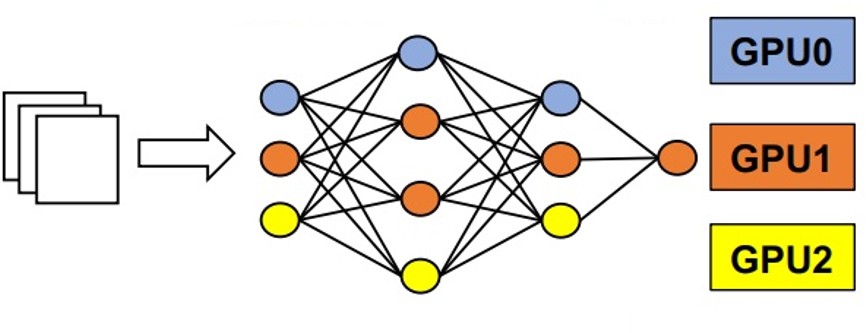
Tensor Parallelism. Image source
3. Data Parallelism#
In data parallelism the entire model sits on a single GPU and it is exactly copied among the other GPUs. This approach just replicates the model among the available hardware.
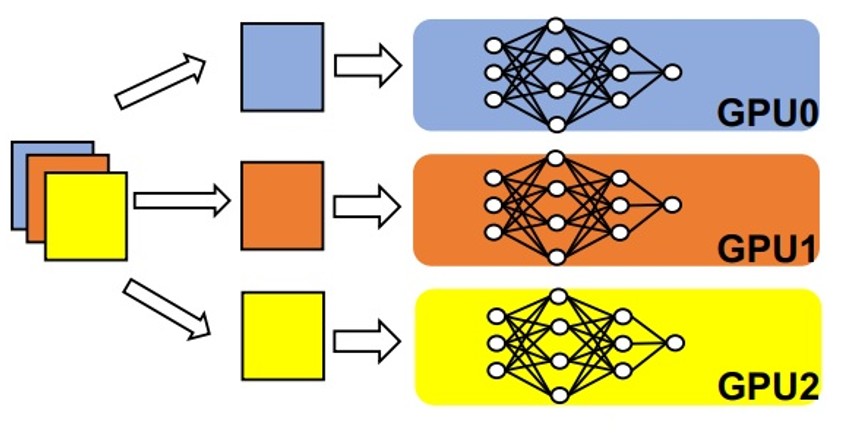
Data Parallelism. Image source
You might consider this approach when there are no hardware restrictions to fit the model on a single GPU but you probably only want to increase your throughput. For example if you have a model that fits on one GPU but you have 3 available GPUs, you can just use all three with data parallelism to multiply your throughput by a factor of 3 (best case).
This approach is a bit different than the other two. For pipeline and Tensor parallelism you cannot get ANY work done since your model does not fit on one GPU. So you use more hardware just to be able to use the model. But in data parallelism, you replicate the model and use more hardware to increase the throughput.
Load Balancer#
If all of your GPUs are holding one replica of the entire model, the question would be who should handle the next incoming request. This is something that is handled by a load balancer. The criteria on which the load balancer decides how to route the incoming request, can be things like Round Robin, load-aware (give the work to whichever that has less work to do) and more.
If you work with vllm, it comes with an internal load balancer to expose a single API endpoint when you are using Data Parallelism.
My Personal Experience with these Concepts#
I wanted to generate 4,000 data entries to compare with golden answers from GPT-OSS-120B model. I was working on a single node with 4xA40 NVIDIA GPUs and running Llama-3.2-3B-Instruct . I wanted to maximize the output throughput to utilize the GPUs to the best way possible. This was on an HPC environment provided by NHR@FAU .
Parallelism in Action#
I was running Llama-3.2-3B-Instruct on 4xA40 NVIDIA GPUs using pipeline parallelism. But the utilization was way off that what I was expecting and the reason was that I was simply using the wrong parallelism approach. Below is a figure that shows the utilization of the GPUs during the inference (data generation). The graphs were depicted by NHR@FAU cluster cockpit in job monitoring system.
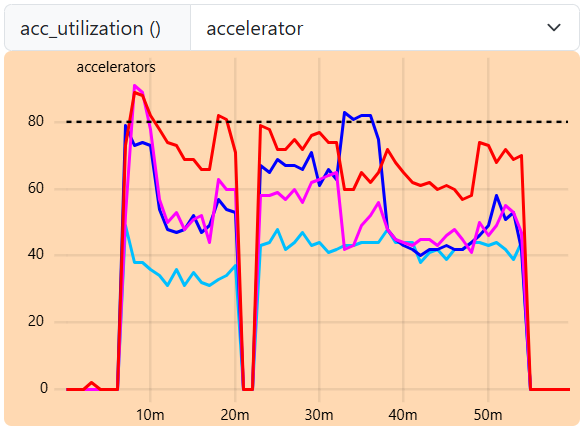
GPU utilization during inference with Pipeline Parallelism showing suboptimal performance
I changed parallelism approach from pipeline to tensor parallelism and the GPU utilization went up to 90% and stayed there!
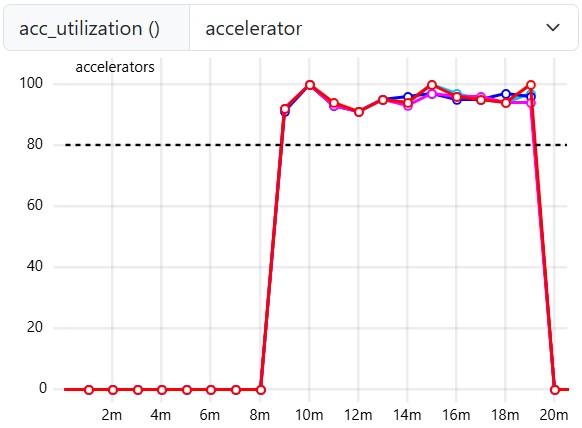
GPU utilization with Tensor Parallelism reaching 90%
[IMPORTANT] My mistake when running the inference on 4 GPUs#
One thing I realized when I was writing this blog post is that I should have had used data parallel instead of tensor parallel since…
- the model would perfectly fit on one GPU
- Tensor parallelism has GPU communication overhead
And I could simply ~4X the through put by using data parallelism approach.
Let’s Walk Through an Example#
Let’s say you set tensor_parallel_size=8 and pipeline_parallel_size=2 and you are using 2 nodes each with 8 GPUs.
❓Question: Is the tensor parallelism applied first and then pipeline parallelism or is it the other way around?
First we break the model layer-wise. We put each sub-layers on each node, and within that node, we break the tensors among the available GPUs. For example, If you have a model with 32 layers, the first 8 layers will sit on node-1 and the second 8 layers will sit on node-2. The first 8 layers, will be distributed via tensor parallel approach among all the available GPUs on that node.
The picture below puts everything in perspective. The model distribution is set to tensor_parallel_size=4, pipeline_parallel_size=2, data_parallel_size=2. We have 4 nodes with 4 GPUs each. Here what happens in this scenario.
- [Pipeline parallelism] The model layers are broken into 4 sub-layers. If the model has 20 layers, each sub-layer has 5 layers. Each sub-layer is assigned to one node.
- [Tensor parallelism] In each node, the matrices of the sub-layer (having 5 layers) are broken into 2 parts and distributed on 2 GPUs. Doing this once, will occupy 2 GPUs (let’s say devices 0,1) and 2 GPUs will be still free (let’s say devices 2,3).
- [Data parallelism] In the last step, The last 2 free GPUs (devices 2,3) are filled with exactly the same matrices that sit on devices 0,1. Basically we have replication.
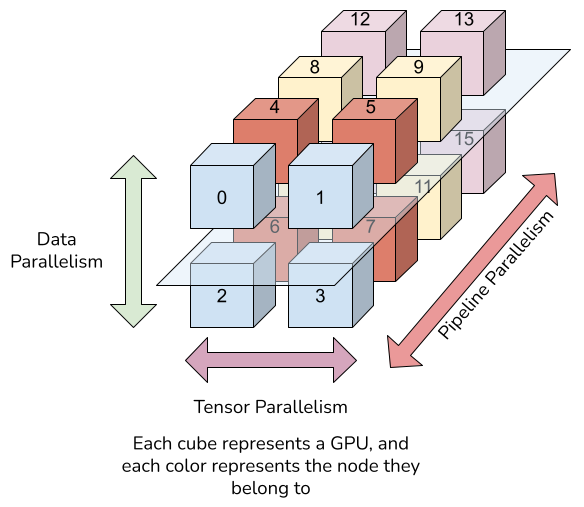
Tensor and pipeline parallelism on multiple nodes. Image source
Lessons learned#
How you set your model distribution is extremely important in fully utilizing your resources. You should usually aim for +90% utilization of your GPUs. If 90%+ is not achieved, something is wrong. Of course, there are some use cases that it might be impossible to reach this level of utilization, but aim for the stars anyway.
I am open for collaboration. I am interested in solving and talking about problems related to serving AI and the system operations around it. If you have problems related to reliable deployment of AI systems (on cloud, HPC or even on-perm), feel free to write me an email.